Quick Answer
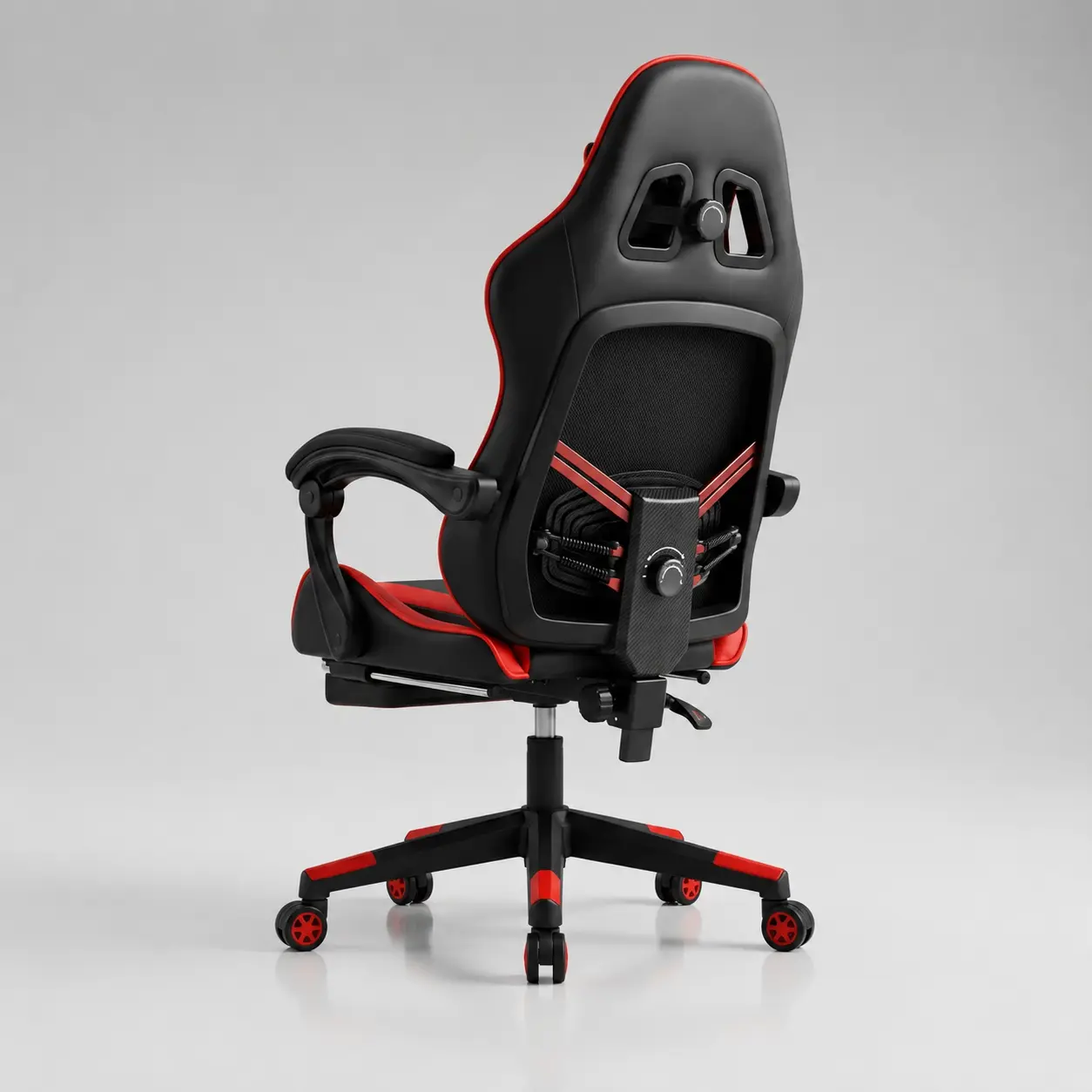
Dynamic lumbar support is designed to maintain contact with the lower back as the user shifts, reclines, or changes posture. It can provide a wider fit range than a loose lumbar pillow or a fixed backrest curve, but the term does not describe one standard mechanism. Buyers must check what moves, how far it adjusts, whether pressure can be reduced, and how the system performs after repeated use.
The sections below provide a mechanism comparison and sample-test checklist. For related quality risks, open our gaming chair quality issues guide.
Why Dynamic Lumbar Support Is a 2026 Buying Topic
Gaming chair development is moving beyond detachable cushions. Current premium products emphasize adaptive lumbar contact, multi-direction adjustment, pressure distribution, breathable materials, and support during posture changes. Razer’s 2026 Iskur V2 NewGen announcement, for example, highlights an adaptive adjustable lumbar system and cooling-focused materials.
This does not mean every market needs a premium mechanism. It means buyers are learning to ask better questions. “Lumbar pillow included” is no longer enough information for a product page or a sourcing decision.

The problem with one fixed support point
Body dimensions vary. The same lumbar curve may sit correctly on one user and press too high on another. Support can also disappear when the user reclines or slides forward. A dynamic system tries to reduce this mismatch by moving, flexing, or pivoting with the back.
The commercial opportunity
For brands and distributors, dynamic lumbar support creates a product story that customers can understand. It can separate a comfort-led model from a basic racing chair. The story only works when the mechanism is visible, explainable, and supported by a useful adjustment range.
Four Common Lumbar Support Designs
| Support Type | How It Works | Strength | Buyer Risk |
|---|
| Loose lumbar pillow | Strapped or placed against the backrest | Low cost and easy to replace | Can move or feel bulky |
| Fixed backrest curve | Support is shaped into the backrest | Simple structure | Limited fit range |
| Height/depth adjustable lumbar | User changes position or protrusion | More personal fit | Adjustment may be limited or loose |
| Dynamic or adaptive lumbar | Support flexes or follows posture changes | Maintains contact across more positions | More parts and durability checks |
A pillow is easy to understand, but easy to misuse
A pillow can work when its height, thickness, and firmness match the user. It can also push the pelvis forward or create a pressure point. B2B buyers should ask whether the straps allow vertical adjustment and whether the pillow thickness can be changed.
Adjustability needs a usable range
A dial or lever looks good in a listing, but buyers need measurements. Ask for lumbar height range, depth range, control direction, and the amount of force needed to adjust it. Check whether the user can operate the control while seated.
How Dynamic Lumbar Support Should Feel
Good lumbar support should contact the lower back without forcing an exaggerated arch. Users should be able to sit upright and recline slightly while keeping stable contact. The support should not create a hard pressure point during a 30 to 60 minute sitting test.
OSHA guidance recommends a backrest that follows the natural spinal curve and a lumbar support position that fits the small of the back. It also recommends enough backrest adjustment to support different seated postures.
Pressure is not the same as support
A stronger push does not automatically provide better support. If the mechanism concentrates pressure in a small area, users may describe it as “poking” rather than supporting. Test at the minimum, middle, and maximum settings.
Recline changes the test
A support system may feel correct upright but lose contact during recline. Test the chair with the backrest locked, unlocked, and at the intended recline positions. Watch whether the lumbar panel follows the user smoothly or snaps between positions.
B2B Durability Checks for the Lumbar Mechanism
Dynamic support adds moving or flexible parts. That can improve fit, but it also creates new inspection points. Buyers should review pivot points, springs, flexible panels, knobs, cables, fasteners, noise, and access for repair.
- Cycle the adjustment repeatedly and check for looseness.
- Apply pressure at the center and edges of the lumbar panel.
- Listen for clicking, rubbing, or sudden movement.
- Check whether upholstery catches around moving parts.
- Confirm replacement parts and assembly instructions.
- Compare the approved sample with pre-shipment units.
Add these checks to the wider ten-point wholesale gaming chair inspection plan.
When Buyers Should Choose Dynamic Support
Dynamic support makes the most sense for mid-range and premium programs where long-session comfort is a primary selling point. It also fits office-gaming hybrid products, content creator setups, and brands that can explain the function with video and clear adjustment instructions.
A simpler adjustable pillow or built-in curve may be better for entry-level retail, internet cafes, or projects where replacement cost and easy maintenance matter more than adjustment depth.
Match the mechanism to the sales channel
Online buyers need clear diagrams, measurements, and adjustment videos. Retail stores benefit from a function customers can feel during a short trial. Project buyers may care more about durability and spare parts than novelty.
Do not isolate the lumbar feature
Lumbar support cannot compensate for the wrong seat depth, armrest height, foam firmness, or desk setup. Compare it as part of the complete chair. The FT-055D OEM/ODM gaming chair and FT-1206 office-friendly gaming chair provide two useful starting points for different positioning.
Questions to Send a Gaming Chair Supplier
- Is the lumbar support fixed, adjustable, or adaptive?
- Which direction does it move, and what is the adjustment range?
- Can the pressure or protrusion be reduced?
- What components carry the load?
- What cycle or durability checks are available for the mechanism?
- Can we inspect a sample before confirming mass production?
- Which lumbar parts can be supplied as replacements?
- Can the adjustment instructions be branded for our market?
A supplier should answer these questions with drawings, measurements, samples, or test documentation. Marketing labels alone are not enough. Our guide to choosing a reliable China gaming chair factory explains what other evidence to request.
Hengyao OEM and Wholesale Support
Hengyao Chair is based in Anji County, Huzhou City, Zhejiang Province, China. Buyers can discuss backrest structure, lumbar design, foam, upholstery, armrests, recline functions, logo application, packaging, and sample confirmation for OEM and wholesale programs.
Start with the gaming chair product range. Then send the target market, user profile, quantity, price level, and required lumbar function through the gaming chair sourcing form. This gives the factory enough information to recommend a realistic structure.

Related sourcing path: For broader sample approval, review the gaming chair quality issues checklist and the wholesale gaming chair category before choosing a lumbar support model.
Related buyer path: Connect lumbar support checks with the gaming chair gas lift sinking guide, gaming chair quality issues checklist, and wholesale gaming chair category.
FAQ
What is dynamic lumbar support in a gaming chair?
It is a support structure designed to maintain lower-back contact as the user changes posture. The exact mechanism varies by product.
Is dynamic lumbar support better than a pillow?
It can fit more positions and body types, but it costs more and needs durability testing. A well-sized pillow can still suit simpler products.
Can lumbar support prevent back pain?
A suitable chair may support posture and comfort, but it is not a medical treatment. Users should change position regularly and seek professional advice for persistent pain.
What should importers test on a sample?
Test support height, pressure, recline contact, adjustment controls, noise, looseness, upholstery movement, and repeatability.
Sources and Next Step
References: OSHA chair ergonomics guidance and Razer’s 2026 adaptive lumbar product announcement.
To compare suitable OEM structures, ask Hengyao for lumbar options, sample details, and bulk-order requirements.




 English